

Dec 16th, 2020 by Smile Harney
Have recorded some videos with TiVo and want to transfer them to your Windows computer for playback? Well, with the help of TiVo Desktop/Desktop Plus for PC, users can easily transfer the TiVo recorded video files to PC, but from users feedback, we know that most of them failed to play their TiVo videos on their Windows computers after the transferring. How to successfully play TiVo in Windows Media Player? The following article will just introduce a professional TiVo to Windows Media Player Converter - iDealshare VideoGo to help users to successfully play any TiVo video file on any Windows Media Player.
The following steps will work to convert any TiVo video file to any Windows Media Player version best supported AVI, WMV, MPG, ASF etc


Free download the ideal VOB to AVI converter - iDealshare VideoGo (for Mac, for Windows), install and run it, the following interface will pop up.
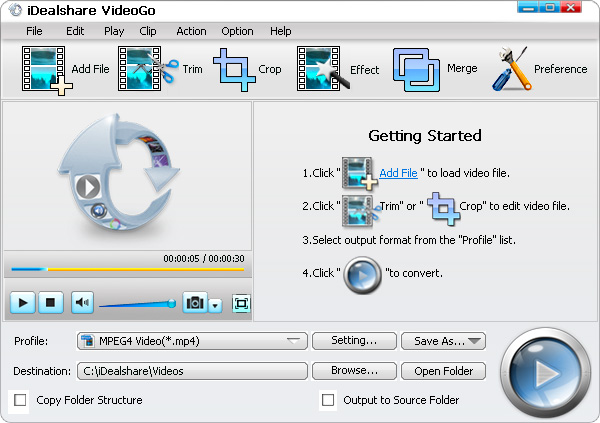
First, use the TiVo Desktop/Desktop Plus for PC to transfer TiVo file to computer and then click the "Add file" button to add the TiVo file to iDealshare VideoGo. Or simply drag and drop the TiVo recordings to this TiVo to Windows Media Player Converter.
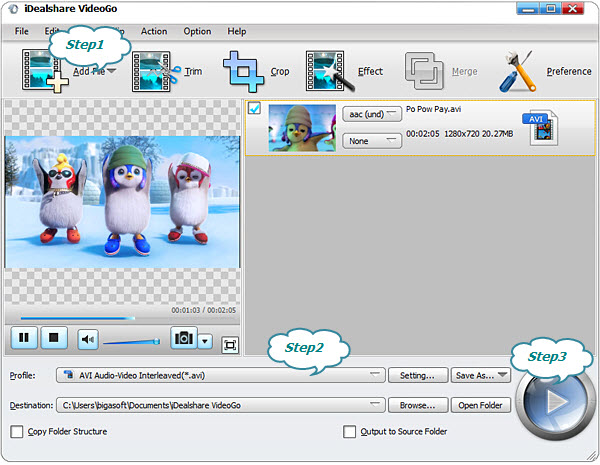
Then, click the "Profile" button and select Windows Media Player more supported AVI, MPG or WMV as the output format from the General Video category.
Finally, click the Convert button to start converting TiVo video to Windows Media Player more supported AVI or other video format.
Home | About iDealshare| Privacy Policy| Contact US | EULA | Uninstall | Affiliate
© 2026 iDealshare, All Rights Reserved.