

October 13th, 2020 by Smile Harney
The Android system is one of the two giant systems in the world. It is convenient, smart, and fast, and is loved by most people. But when people use Android devices and Android systems, they are also restricted on using it to play some video formats. For example, can you play VOB video on Android?
Absolutely, you cannot directly open and play VOB on Android devices, because the VOB isn't supported or compatible with Android system. Then, how to pay VOB files on Android? Is there any professional way to successfully play VOB on Android?
The best way is that users can convert VOB files to Android compatible formats like MP4 and 3GP by using iDealshare VideoGo. This video converter can perfectly convert your sources video format to target video format with super fast speed and wonderful conversion quality. You don't need to study it carefully before using it, and it is very easy to understand and operate. Following the next steps and know more about the iDealshare VideoGo.
The following will show a step by step guide on how to convert VOB to Android more supported video format with the help of iDealshare VideoGo.
Free download the ideal VOB to Android Converter - iDealshare VideoGo (for Windows, for Mac), install and run it, the following interface will pop up.
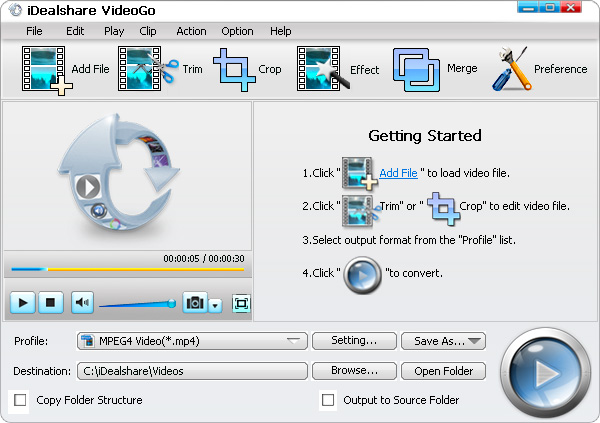
Firstly, click the "Add file" button to load the source VOB file to this converter interface.
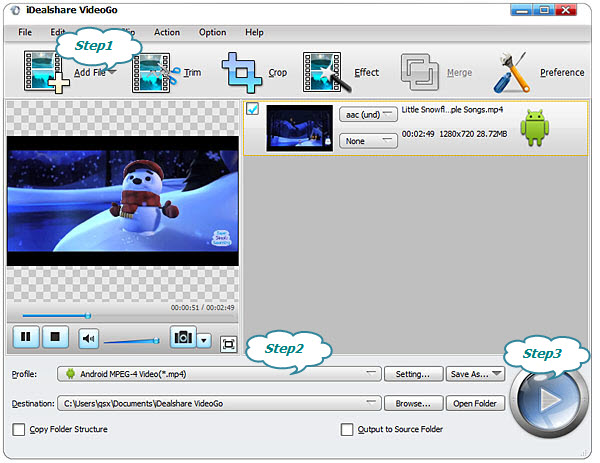
Click the "Profile" drop-down button to select Android supported MP4 or 3GP from "Android" or "Android Pad" or "General Video" or "HD Video" category.
Finally, click the "Convert" button to start and finish the conversion of VOB to Android supported MP4.
Home | About iDealshare| Privacy Policy| Contact US | EULA | Uninstall | Affiliate
© 2026 iDealshare, All Rights Reserved.